
NASA Ames Research Center · Human-Computer Interaction Internship · 2022
Redesigning Playbook's Icon System
Small icons carried outsized responsibility in a dense scheduling interface, and the legacy set was working against its own users. I rebuilt Playbook's icon language from the geometry up, so operators could recognize an action at a glance instead of pausing to decode one.

ROLE
Human-Computer Interaction Intern
TIMELINE
Jan - March 2022
TEAM
SPIFe, NASA Ames Research Center
FOCUS
Iconography, visual systems, legibility
Icons in context
Completed alongside my redesign of Playbook’s constraint experience, these icons live inside a dense mission-planning interface, where they need to stay recognizable at a glance rather than merely look polished at portfolio scale.
The real design constraint: tiny controls inside a crowded expert workflow.
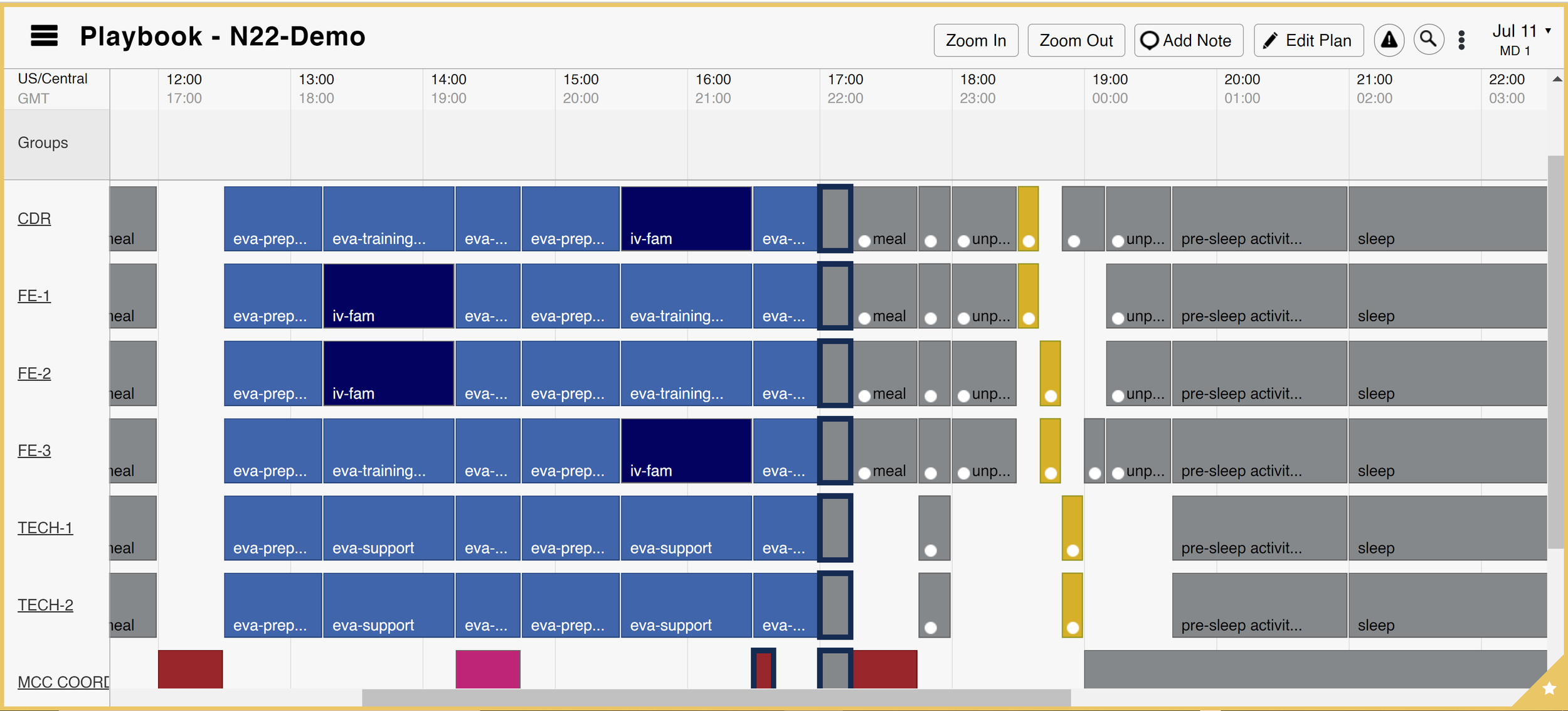
The real design constraint: tiny controls inside a crowded expert workflow.
THE PROBLEMDozens of small icons, and the legacy set wasn’t holding up
Icons varied in style, weight, and metaphor. Some collapsed into illegibility at small sizes; similar actions could be mistaken for one another. In a consumer app that reads as inconsistency. In an expert scheduling tool it costs speed, confidence, and learnability. Every unclear icon asks the user to stop and decode the interface instead of acting on it.
The legacy icon set: inconsistent weight, competing metaphors, easy to misread at small sizes.
EVALUATING ICONSJudged by performance, not polish
Rather than judge icons by how they looked in isolation, I evaluated each against four principles: how it would actually perform inside a dense, high-stakes interface.
▣ Legibility
Could the icon hold up at small sizes in a dense UI?
▣ Understandability
Could users infer the intended action or concept without unnecessary interpretation?
▣ Distinguishability
Could similar actions remain visually separate from one another?
▣ Approachability
Could the system feel modern and clear without becoming too playful for a mission planning tool?
FROM PRINCIPLES TO VISUAL RULESEnough shared structure to belong together
The goal wasn’t to make every icon identical. It was to build enough shared structure that existing and future icons would feel like they belonged to the same product.
EXPLORING THE REDESIGNTwo icons carried the heaviest exploration
“Book” needed testing across visual weight and shape language before it held up at small sizes. “Compress left” had no real-world metaphor to lean on: an abstract scheduling action, so clarity had to come from form alone.
Design variations for “book” icon
Exploring visual weight, shape language, and readability.
Design variations for “compress left” icon
Testing how action-based icons could stay clear at small sizes.
REDESIGNING AMBIGUOUS ICONSUnclear next to their neighbor
Some of the hardest icons weren’t unclear on their own. They were unclear beside a look-alike. In an expert tool, users build speed through repeated recognition; when two icons blur together, that speed breaks down. Pick a pair:
COPY VS. CLONESeparate actions that shared the same visual idea
Diagnosis: Both symbols depended on overlapping rectangles, so the actions blurred together when scanned quickly.
Resolution: I preserved the idea of duplication while changing structure and directional cues so each action could develop its own silhouette.
SLICE AND DICE VS. CUTClarify two destructive actions with different outcomes
Diagnosis: Both actions could default to a generic scissors metaphor, which described the tool rather than the distinct result.
Resolution: The redesign emphasized the transformation of the object, making the outcome—not just the gesture—visible.
ZOOM VS. SEARCHKeep a familiar metaphor from becoming generic
Diagnosis: The magnifying glass was recognizable but overloaded, representing both navigation and information retrieval.
Resolution: I differentiated the internal detail and surrounding form so the two controls stayed related without becoming interchangeable.
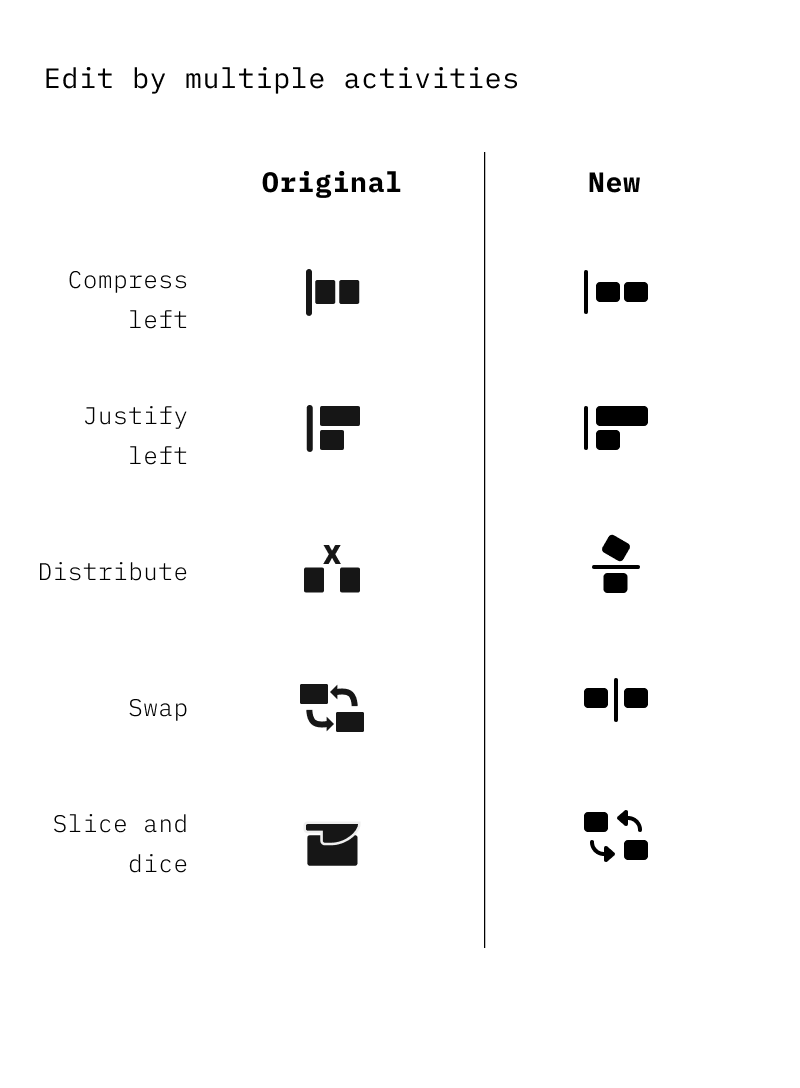
DISTRIBUTE VS. SWITCHUse spatial behavior to distinguish abstract scheduling operations
Diagnosis: Neither action had a strong physical-world metaphor, so their meaning depended on showing relationships between elements.
Resolution: I used position, direction, and symmetry to make the resulting spatial behavior legible at a glance.
THE FINAL SYSTEMNot just an icon refresh, but also a repeatable language
Stronger shapes, clearer geometry, and consistent visual weight, while preserving the precision a dense scheduling interface demands. Shared stroke rules, spacing, and metaphor guidelines meant future icons could be drawn without feeling detached from the product.
The real deliverable wasn’t better icons. It was a repeatable visual language for designing the next one.
Sample of redesigned icons


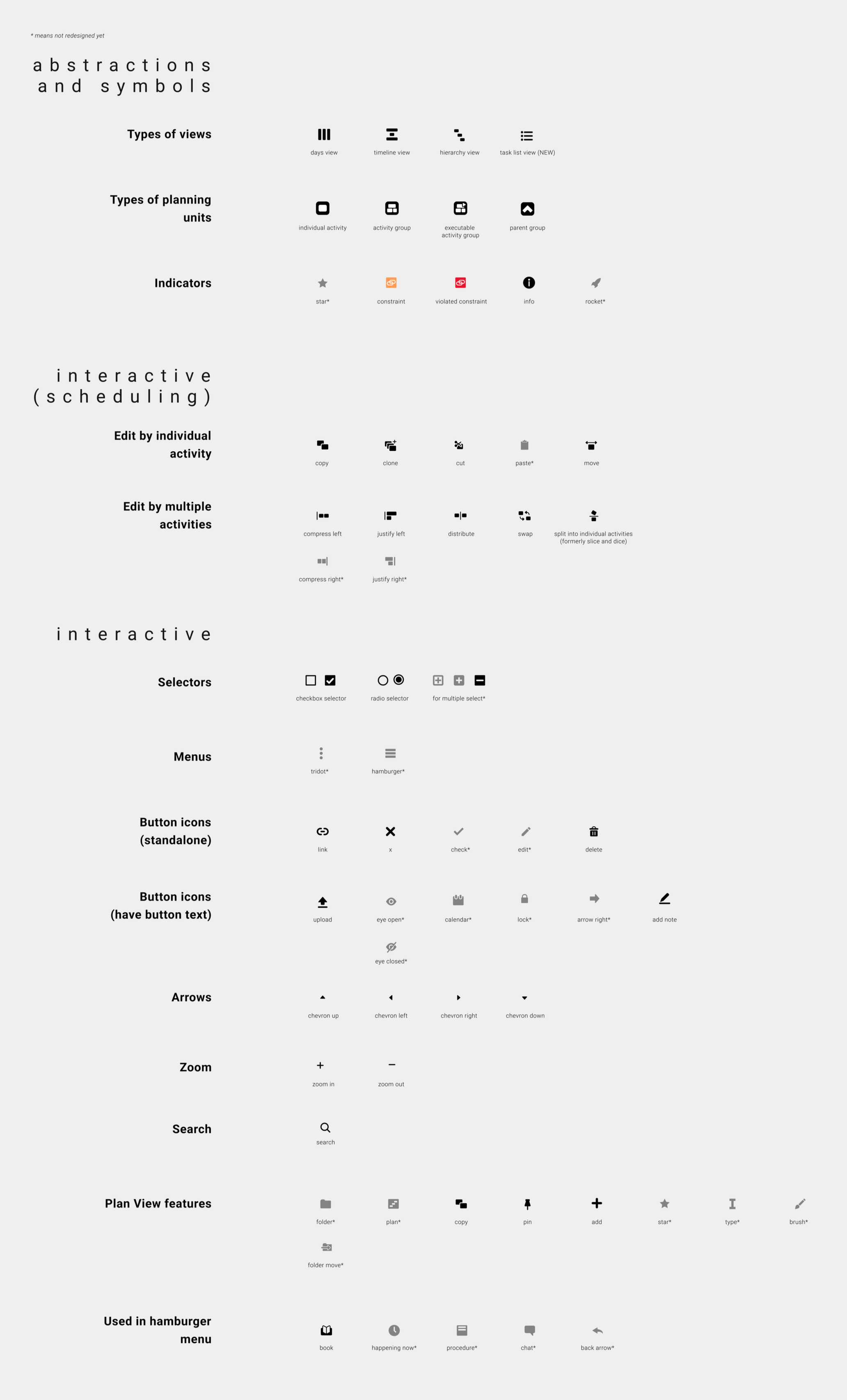
Full final icon library

OutcomeFrom internship redesign to lunar mission operations
Some of the redesigned icons remained in Playbook after my internship, along with visual rules that became part of the team’s broader design system.
Playbook later went on to support NASA payload operations for missions in the Commercial Lunar Payload Services program, meaning that pieces of this visual system ultimately lived inside software being used for real lunar mission planning.
30+
icons redesigned across the library
5
shared visual rules for future icon design
1
extensible system carried into Playbook
REFLECTIONIconography is usability at the smallest scale
A successful Playbook icon had to be legible, semantically accurate, visually distinct, and consistent with the system around it. Style only mattered because it supported recognition.
If I continued today, I’d validate through recognition testing at real UI sizes, especially for abstract scheduling concepts that can’t lean on a familiar physical metaphor. The goal stays the same: clarity that scales.
P.S. one more thing
Bonus content:
NASA concept art
A little something I drew for the mission, off the clock. Fair warning, it’s very cute.
✦ Take a peek